

Individual Agent Architecture
Core Agent Components
Each Elementum agent follows a standardized internal architecture that balances AI capabilities with deterministic control structures: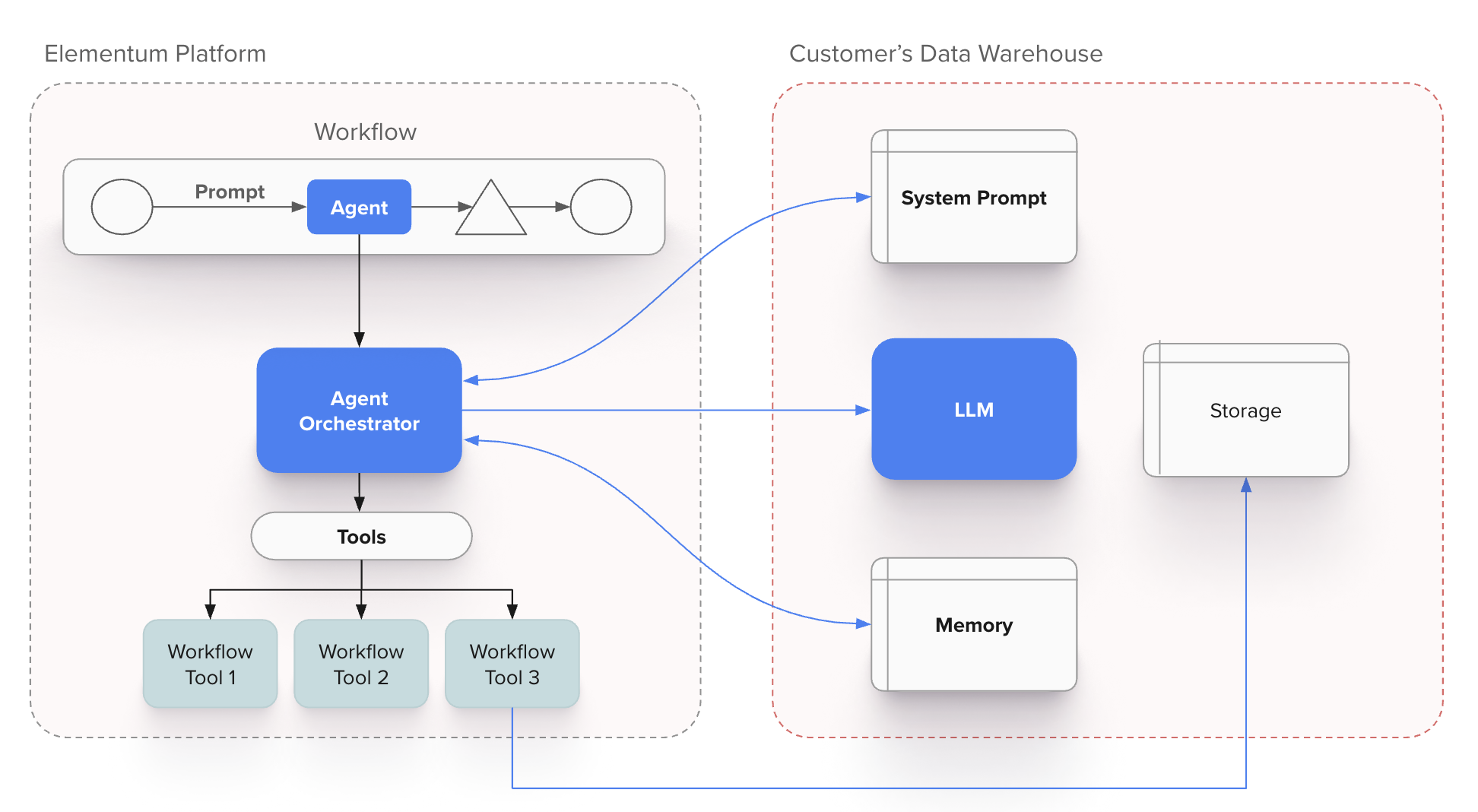
Agent Component Functions
- System Prompts: Define agent behavior, expertise domain, and operational constraints
- Orchestrator: Manages execution flow, tool calls, and contextual state
- LLM Engine: Provides natural language understanding and generation capabilities
- Memory Systems: Maintain context, conversation history, and learned patterns
- Tool Registry: Catalog of functions and integrations the agent can invoke
- Customer Data Access: Secure, governed access to relevant business data
Deterministic Control Mechanisms
The agent orchestrator enforces deterministic behavior through:- Workflow Action Constraints: Predefined actions that limit agent behavior to approved operations
- Data Access Controls: Strict boundaries around what data the agent can access and modify
- Tool Invocation Rules: Defined conditions for when and how external tools can be used
- Escalation Triggers: Automatic handoff to human oversight based on confidence thresholds or business rules
Multi-Agent Coordination via A2A Protocol
Agent2Agent (A2A) Protocol Implementation
The A2A protocol enables standardized communication between Elementum agents and external agent systems. The protocol operates through several key mechanisms:For complete A2A protocol specification and additional resources, see the A2A Project Documentation.
Direction of A2A Communication
Elementum agents act as A2A receivers (servers), not A2A clients. External systems — other AI agents, automation platforms, or custom applications — connect to an Elementum agent: they retrieve its Agent Card, authenticate, and send it messages. See Connecting to an Elementum Agent via A2A for the receiver-side setup. Elementum does not act as an A2A client. There is no way to install, import, or register an external agent’s Agent Card in Elementum, and an Elementum agent cannot call out to another system’s A2A endpoint to discover or consume its capabilities. To use an external, third-party agent’s capabilities inside an Elementum workflow, connect a managed agent through App Intelligence rather than A2A. Elementum supports two managed agent runtimes:- Snowflake Cortex Agents — agents that run on your Snowflake data warehouse.
- AWS Bedrock Agents — agents built in your own AWS account.
Agent Card Structure
Each agent publishes a standardized Agent Card that serves as both a discovery mechanism and capability contract. The Agent Card includes:- Identity and Capabilities: Unique agent identifier and list of specific functions the agent can perform, such as document analysis, compliance checking, or data transformation.
- Communication Endpoints: Technical connection details including A2A protocol endpoints and health check URLs for establishing secure communication channels.
- Authentication Requirements: Security specifications covering authentication methods, required permissions, and access scopes needed for interaction.
- Data Schemas: Structured definitions of expected input formats and guaranteed output formats to ensure compatible data exchange between agents.
- Governance Metadata: Compliance and operational requirements including audit trails, data residency constraints, and regulatory certifications that govern agent interactions.
A2A Authentication
Elementum supports two authentication methods for A2A communication: OAuth Client Credentials Flow Standard OAuth 2.0 client credentials grant for machine-to-machine authentication. External agents obtain access tokens from an authorization server and include them in A2A requests. Self-Signed JWT Authentication For scenarios where external agents issue their own JWTs, Elementum validates tokens using the following configuration:
Required Claims
You can enforce additional JWT claims that must be present with specific values. This is useful for restricting access to particular clients or tenants:
A2A Communication Flow
Inter-Agent Communication Patterns
Synchronous Request-Response
Synchronous Request-Response
- Direct agent-to-agent calls for immediate responses
- Timeout handling and circuit breaker patterns
- Used for validation, lookup, and simple transformations
Asynchronous Task Delegation
Asynchronous Task Delegation
- Long-running operations with callback notifications
- Status polling and progress updates
- Used for analysis, document processing, and complex workflows
Event-Driven Coordination
Event-Driven Coordination
- Agents subscribe to relevant business events
- Reactive processing based on data changes
- Used for monitoring, alerting, and automated responses
Workflow Integration Architecture
Deterministic Structure Around Non-Deterministic Agents
Agents operate within workflow frameworks that provide governance and predictability:Workflow-Agent Integration Points
- Task Assignment: Workflow engine determines when and where to invoke agents
- Context Provision: Agents receive structured context and constraints from workflow state
- Result Validation: Agent outputs are validated against business rules before proceeding
- Exception Handling: Failed or low-confidence agent responses trigger defined escalation paths
Connecting to an Elementum Agent via A2A
External systems can connect to Elementum agents that have been configured for A2A access. The connection follows the standard A2A handshake pattern. You can also expose an Agent Gateway over A2A so callers reach the gateway and its routing through one entrypoint.A2A is one-directional in Elementum: your agent is the receiver, and the external system is the caller. An Elementum agent cannot consume or install another system’s Agent Card. To bring an external agent’s capabilities into a workflow, connect a managed agent through App Intelligence (Snowflake Cortex or AWS Bedrock). See Direction of A2A Communication.
The A2A protocol is an evolving standard. The examples in this documentation reflect Elementum’s current implementation. Contact your Elementum representative if you have questions about integration.
Configure A2A Authentication
Configure how external systems authenticate when calling your agent from the Authentication section of the agent’s Configure page. Elementum supports two authentication methods:- OAuth — Standard OAuth 2.0 client credentials grant for machine-to-machine access. No additional fields are required in the Agent Configuration page.
- JWT — Self-signed JSON Web Tokens issued by an external system and validated by Elementum. Requires the configuration below.
The Authentication section controls how callers prove their identity to the agent. Streaming behavior is configured separately on the Connections tab; see A2A Conversation Settings.
JWT Authentication
Click + Add Authentication in the JWT section to open the configuration dialog. Elementum validates incoming tokens against a public key you provide.
The caller signs each request with their private key, and Elementum verifies the signature using the configured public key. Because only the private key holder can produce a valid signature, a successful verification confirms the request’s authenticity.
For the protocol-level specification—including required claim semantics and authentication flow details—see A2A Authentication below.
Discover Agent Capabilities
Each Elementum agent has a unique A2A endpoint URL in the format:- Agent name and description
- Supported protocol versions
- Available skills and their descriptions
- Authentication requirements
- Capability flags (streaming, push notifications)
Send a Message to Initiate a Task
Use themessage/send method to start an interaction:
file part to the parts array with the file’s name, contentType, and a uri pointing to the file location:
You can include multiple file parts in a single message, and they can be combined with text parts in any order. Both
message/send and message/stream support attachments.
Receive Task Response
The agent returns a JSON-RPC response containing a Task object. The response includes acontextId that you can use for follow-up messages:
Streaming Responses
Elementum agents support streaming responses viamessage/stream using Server-Sent Events (SSE). This delivers real-time updates as tasks are processed — useful for long-running operations or when you want to display incremental progress to users.
Initiating a Streaming Request
Use the message/stream method instead of message/send:
Event Types
Every streaming response contains two event kinds, per the A2A spec:TaskStatusUpdateEvent
Status updates track what the agent is doing. Thestatus.state field progresses through submitted → working → completed.
A status-update with state: "working" and no message means the agent is processing but has not called a tool yet. When the agent executes a tool, it emits an additional status-update with state: "working" and a status.message containing a description of the tool being executed:
status-update event in sequence.
The final event in every stream is a status-update with state: "completed" and final: true.
TaskArtifactUpdateEvent
Artifact updates carry the agent’s text response, streamed token-by-token. Each event includesappend: true and contains one text chunk. The last chunk in the sequence has lastChunk: true.
Event Sequences
The order of events in a stream depends on whether the agent calls any tools while processing the request.- No tool calls
- Single tool call
- Multiple tool calls
The simplest case — the agent responds directly without executing any tools:
Key Fields
Stream Handling Requirements
- Events are delivered in order and must not be reordered
- The stream ends when you receive a
status-updateevent with"final": true - Terminal states include:
completed,failed,canceled,rejected - Capture the
contextIdfrom the response for follow-up messages in multi-turn conversations
Task States
A2A tasks progress through defined lifecycle states:Multi-Turn Conversations
The A2A protocol supports multi-turn conversations through thecontextId field. When you send an initial message, the server generates a contextId in the response. Include this contextId in subsequent messages to continue the conversation.
Initial Request:
contextId groups related messages, enabling the agent to maintain conversational continuity across multiple interactions. When an agent requires additional input, it returns a task with input-required status—use the same contextId to provide the requested information.
A2A Conversation Settings
Configure conversation behavior for A2A agents on the Connections tab of the agent detail page.A2A Streaming
Enable streaming responses for A2A protocol communication with the agent. When turned on, external systems can use themessage/stream method to receive real-time, incremental responses. See Streaming Responses for protocol details.
Create a Record
When enabled, Elementum automatically creates a record when a conversation is initiated via the A2A protocol. This requires a conversation inactivity timeout to be configured.Conversation Inactivity Timeout
Set the duration of inactivity (in minutes) before a conversation is automatically closed. When a conversation times out or completes, it can trigger follow-up automations.Testing A2A Connections
To test your A2A integration with Elementum agents, use the official A2A Inspector tool: A2A Inspector: github.com/a2aproject/a2a-inspector The inspector allows you to:- Fetch and validate Agent Cards
- Send test messages and view responses
- Monitor streaming events in real-time
- Debug authentication and protocol issues
Protocol Version
Elementum currently implements A2A protocol version 0.3.0 with streaming support. The examples in this documentation reflect the current implementation. For the complete A2A protocol specification, see a2a-protocol.org.Next Steps
- Building Agents — Create an agent, configure tools, and add it to your app
- Agent tools, deployment, and integrations — Tool types, deployment channels, and external agents via App Intelligence
- Help & Resources — Support and additional documentation